Hey RefRunner user! Thanks for checking us out.
I’ve added a few things recently that are pretty cool.
Easier to add custom styles
The custom style interface now lets you add multiple custom styles instead of just one. To use them, Click the avatar and then “settings” to get to the settings page, and then click the Zotero Style Repository link, search for the style you want, and right-click to copy the URL and paste it into the URL field. Use whatever name you want.
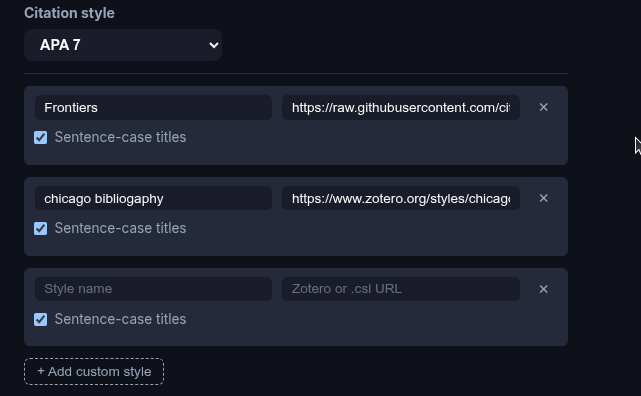
If it’s a style that wants sentence-cased title (like APA) click that box.
Sentence-casing titles for a person is tedious, for a computer program, it’s surprisingly complicated. It isn’t possible to download a list of every proper noun, so I have implemented a bunch of tricks to try to get it right. The meta data is pretty untrustworthy, and there is no way to know if the person who provided the meta data likes sentence case, title case, or even ALL CAPS! The code tries to figure out if what has been provided by the user reference or the meta-data is likely to be correct. The code checks things like
- is it all lower case except they capitalize “Alabama”?
- Does a word have multiple capital letters like ChatGPT?
Chicago Notes & Bibliography reference style is now supported
My PhD is in Education, so I pretty much know only APA. I was rather bewildered to learn that there are two totally different Chicago Styles, and not only do they have different in-text citations, but also the references are formatted completely differently, with the “notes and bib” version putting the year at the end of the reference?
Vancouver/NLM is now supported
I checked a medical paper or two and they use this format, which also includes journal abbreviations. (Even though we’re no longer using ink and paper, we still need to make sure that newcomers to the field can’t tell what journal a paper is in without clicking on the DOI?). It turns out NLM has a database of abbreviations they think are Really Good, so if you use that style, your browser will make an extra query for each journal to get the short name for it.
Journal abbrevs for other styles also supported
The Good People at NLM don’t care about abbreviating every journal, just the ones they like, so for other styles that want short titles, we have to do it a different way. It turns out there’s an ISO-4 standard for abbreviating titles (that is, maybe, different from the one that the NLM people use?). So if you select a style that uses short journal titles, we change the name of the journal to match. I hope that someone is happy about this! If it’s you, I would love to hear!
Check that URLs work and update access date
I’ve been putting this off, but I came across someone that had several URLs, and figured out a fairly easy way to check the title of a URL, so I implemented this. We make sure the URL works, try to get the title (which we can’t for sites like Medium that take extra measures to keep computer programs from getting even a title from their pages). The title from the URL gets compared to the one in the reference, and if they are different RefRunner provides a version with the title updated. I suspect that publishers change their title a bunch of times doing A/B testing, so many URLs may give multiple titles, especially soon after publication.
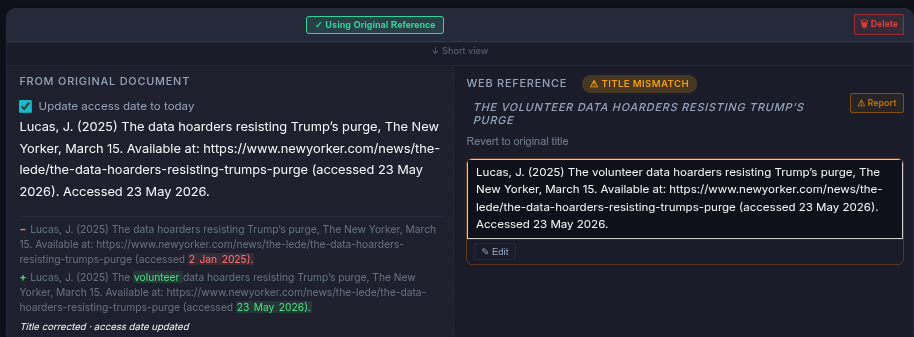
Here you can see that we get the current title from the site and update the “accessed” date. I think this is pretty slick. GenAI and Academic Writing includes a whole bunch of URLs, so it was a good test case. It also used the new epub import feature that is handy if you want to check out references from an article you didn’t write.
Please help spread the word!
If https://www.refrunner.com/ is saving you time, please let your colleagues know. You can also post in the Testimonials - RefRunner Hub category.