Build a reference list from a bunch of PDFs
A little-known feature is that you can add a reference to a list by dropping a PDF. If you have an empty reference list and drop a single PDF, RefRunner will check its references, but if you have an existing list of references or drop multiple PDFs at once, they’ll get added as references. Reasonable publishers include the document’s DOI somewhere in the first couple of pages (sometimes the first page might be added by your library’s Inter library Loan Department, for example).
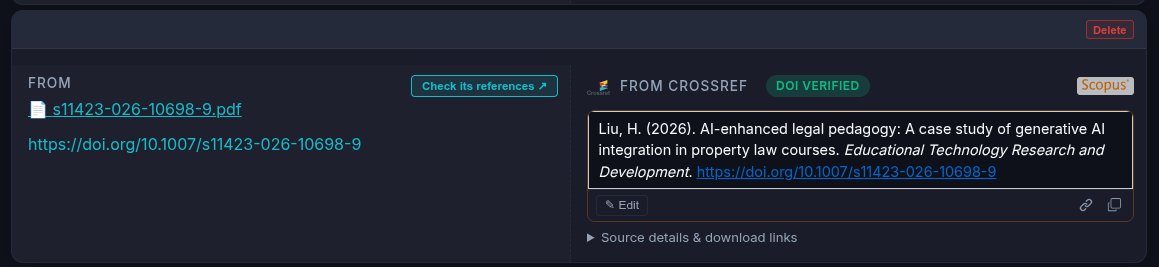
If the PDF is missing a DOI for some reason, RefRunner will look for authors and titles (looking at font sizes and such) and then do a search for those. If it fails, you can do a search yourself.
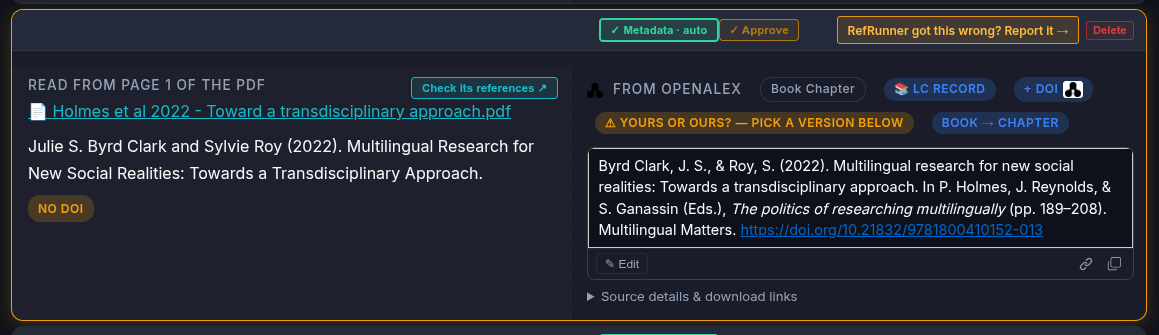
You can click the filename to open the PDF in your browser. You can also click a button to open a new tab with all of the references from that paper. This is handy if you’re reviewing a set of papers, as one user did recently reviewing for a conference.
Sessions now is File menu
A very important user remarked that they didn't know what the "Sessions" button was for, so I've renamed that the "File" menu. It's not quite the same thing as the file menu on most applications, but it seemed like the least confusing name anyway.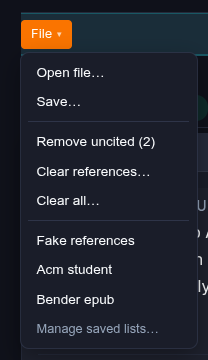
Here you can:
- open file (same as clicking the upload button)
- save—Save the current reference list with a name
- remove uncited—delete all references not cited in the paper
- Clear References—remove all references, but not the in-text citation
- clear all—start a fresh reference list
- Open a saved reference list
Improved Sentence Casing for Article Titles
We had been maintaining a list of styles that require article titles to be sentence-cased, which meant for thousands of styles we were doing it wrong. There is a way to indicate your preference when creating a custom style, but that’s fiddly. The style files will Title Case titles on their own, so now we sentence case everything and let the style handle the Title Casing. Sentence casing is supposed to be done in the metadata, but it can’t be trusted. A publisher might make the titles ALL UPPER CASE, or any imaginable wrong way to do it. Sometimes they’ll include HTML or other indications for proper nouns that should be upper-cased. As part of these fixes we now fix some other issues like “U.S.”, not “U. S.” and small-caps hyphenated words like “AI-supported” don’t get split apart.
ORCID pages get more accurate
You can check how your own metadata looks at https://www.refrunner.com/orcid. You can see what your own ORCID record has for your publications, as well as check your OpenAlex record for all publications that include your ORCID—sometimes there is more than one. If you’re a young scholar, you should probably be vigilant about seeing that publishers include your ORCID iD in every publication.
Improved Scholar Searches
Academic Paper Search — RefRunner Scholar lets you search works in https://openalex.org/ by keyword and filter by year, field, and, as of recent changes, by study design (randomized trials, systematic reviews, and more),thanks to work done at OpenAlex. If you haven’t checked it out, you should. It’s like Google Scholar, except there are no ghost references and you get citations that include DOIs.
More stuff
-
drop a redundant “First edition.” The Library of Congress catalogs the edition on all editions, and convention is that outside of a rare books shop, we don’t care about first editions.
-
A dozen small metadata fixes. A title glued in front of an author’s name no longer becomes part of the name, a reference list with no heading is still read as one, an “e.g.” before a numeric citation is still a citation, a chapter title ending in “?” parses correctly, and a legal case citation (“Graham v. Florida, 2010”) is no longer mistaken for a literature reference.
-
Organisations get credited properly. A company or agency that published a web page is now named as its author, and an organisation whose own name contains “and” is matched by its initials instead of getting split into two references.
-
Your saved lists, explained up front. We tell you your reference lists are saved so you can come back to them, and give you an easy way to opt out. The notice shows before anything is actually saved, and no longer blocks autosave while it’s up.
-
Publishers can check their own deposits.
refrunner.com/prefix/<your-doi-prefix>reads a publisher’s Crossref deposits back as a reference list./bookexplains what we know about an ISBN or an ISBN-less book chapter. This gives a Normal Person a way to check on how metadata are being deposited. -
A retraction claim is verified before we badge it, and the “journal fell off Scopus’s list” flag is back — an early warning sign for paper-mill journals.
-
Vancouver/AMA numbering fixes. A single author with the year last, a journal abbreviation before the year, a decade that isn’t a year — none of these wrongly split a reference list anymore. Dissertations now use the “approved” year and stop crediting supervisors as authors.
-
“Did you mean?” now catches a wrong DOI, not just a missing one. If the citation you pasted names one DOI but the record we landed on doesn’t match it, we search again — and either fix it automatically when the mistake was clearly ours, or offer a one-click “Use this match” for the judgment calls.
-
Lookups now prefer a published article over a preprint when a work exists in both places, and Zenodo deposits take their journal name from Zenodo’s own record instead of guessing.